
The interesting demos involve an agent booking travel or researching a market. The deployments that survive contract review and are still running a year later involve matching invoices to purchase orders. This post is about the second kind, because that is where the money is and almost nobody writes about it.
What an agent is, without the marketing
A model call takes input and returns text. An agent wraps that in a loop: the model can call tools, see what came back, and decide what to do next, repeating until it finishes or hits a limit.
That loop is the entire difference, and it is what makes agents useful for operations. Most back-office work is not a question needing an answer. It is a sequence: open the document, find the reference, look it up in another system, compare, decide, record the result, and raise a flag if something does not match. A model alone cannot do that. A model with tools can.
It also explains the cost profile. One user action becomes five or ten billable model calls, each carrying the conversation so far, which is why agent features surprise people on the invoice. The arithmetic is in what it costs to run an LLM feature in production.
Which jobs qualify
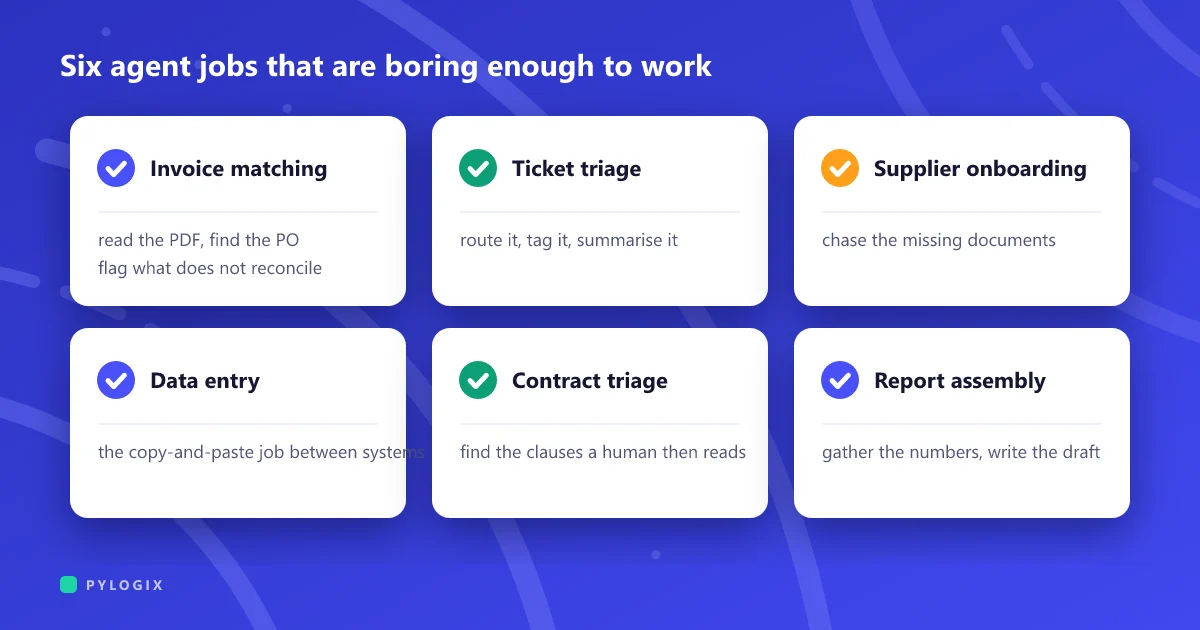
Six jobs that are boring enough to work
Every one of these shares the same shape. High volume, a clear definition of correct, a human already checking the output today, and a mistake that is embarrassing rather than expensive. That combination is why they work, and it is the test to apply to any candidate.
Notice what is absent: nothing here replaces a role. Each one removes the mechanical part of a job and leaves the judgement. That is not modesty about the technology, it is the design decision that makes the deployment survivable. Systems built to replace a person need to be right every time. Systems built to prepare work for a person need to be right most of the time and honest about the rest, which is achievable today.
The three rules that are not optional
Cap the loop. A fixed maximum number of steps, after which it stops and escalates rather than continuing. This is simultaneously your cost ceiling and your blast radius, and it is a single number in a config file.
Make every action reversible or approved. Reading is free. Writing needs a category: either it can be undone by a person in a minute, or it goes through an approval. Issuing payments, emailing customers and changing prices belong in the second group regardless of how good the agent gets.
Log the whole trace. Every tool call, every result, every decision, kept and readable. When someone asks why the agent did something in March, the trace is the only answer that exists. It is also what your evaluation set is built from, which connects to testing software that answers differently every time.
Those traces contain everything the agent read, which is frequently the most sensitive content in the business. They are a copy of your data in whatever tool you chose for observability, usually with a more generous retention policy than the systems the data came from. Treat the trace store as a system of record with its own access control, not as debug output. The wider problem is in building an AI feature on your own data without leaking it.
Measure the escalation rate, not the accuracy
Accuracy is the wrong headline metric because it hides the distinction that matters. Two agents can both be 85% correct: one escalates the 15% it was unsure about, the other confidently gets 15% wrong and tells nobody. The first is a useful colleague. The second is a slow-motion audit finding.
So track three things instead:
- Handled rate. What proportion completed without a person. This is the business case.
- Escalation rate. What proportion it correctly declined to finish. This should be non-zero, and a rate of zero is a warning rather than an achievement.
- Escaped error rate. What proportion it completed wrongly without flagging. This is the only number that should have a hard threshold attached.
An agent starting at 60% handled with a 2% escaped error rate is a good launch, and the handled rate climbs as you feed the escalations back into the prompt and the evaluation set. Launching at 95% handled with a 12% escaped error rate is worse in every way that matters, and it is what you get by tuning for the first number alone.
Build or buy
The same test as everywhere else: is this process how you compete, or is it overhead you happen to have? Invoice matching is not a competitive advantage and there are products that do it. The particular way you triage claims, price a job or route work to your own people may well be, and no product encodes it.
The wrinkle specific to agents is that the buy option often needs the same integration work anyway, because the agent has to reach your systems either way. That reduces the saving, so check it before assuming buying is cheaper. The general form of the argument is in build or buy.
Before you start
- Pick the task by volume, not by interest. The dull, frequent one with an existing human checker beats the ambitious one every time.
- Write down what correct means, as a rule someone could apply by hand. If you cannot, the agent has no target and neither does your evaluation.
- Find out who does it today and involve them. They know the exceptions, and the exceptions are the project.
- Classify every action as read, reversible write, or approval-gated. Before any code.
- Set the step cap and the escaped error threshold as launch criteria, in writing.
- Plan for the escalation queue to be real work at first. It shrinks, but somebody owns it from day one.
Related: from pilot to production covers why these stall, where AI actually pays off covers choosing between candidates, and data readiness covers what has to be true first.
Our AI and machine learning team builds these with the step cap, the approval gates and the trace store in the first version, because retrofitting them means explaining an incident first. If you have a high-volume process someone is doing by hand between two systems, describe it to us.
Common questions
What are AI agents actually useful for in business operations?
High-volume, well-defined work that already has a human checking the output: matching invoices to purchase orders and receipts, triaging and routing support tickets, chasing missing onboarding documents, moving data between two systems that will never be integrated, first-pass contract review, and assembling routine reports. The common shape is a clear definition of correct, a mistake that is embarrassing rather than expensive, and enough volume to justify the build.
How do you stop an AI agent doing something harmful?
Three controls. Cap the number of steps so it stops and escalates rather than looping indefinitely, which is both the cost ceiling and the blast radius. Classify every action as read-only, reversible write, or approval-gated, and put anything irreversible such as payments or customer messages in the third category. And log the complete trace of tool calls and decisions, because when someone asks why it did something months later that trace is the only answer that exists.
What metric should you use to judge an AI agent?
Not accuracy. Track the handled rate, meaning the proportion completed without a person, the escalation rate, meaning the proportion it correctly declined to finish, and the escaped error rate, meaning the proportion completed wrongly without flagging. Only the last needs a hard threshold. An escalation rate of zero is a warning, not an achievement, because it usually means the agent is confident about things it should not be.
Should we build or buy AI agents for back-office work?
Buy the commodity processes that are not how you compete, and build the ones that encode how you specifically work. The wrinkle particular to agents is that a bought agent still has to reach your systems, so much of the integration effort exists either way, which reduces the saving. Check that before assuming the bought option is cheaper.
Note on sources
This article is drawn from delivery practice rather than published research, and we have not attached percentages to it. Figures circulating for agent adoption and time savings come largely from vendor surveys and product marketing, and repeating them would give a false impression of precision.
The one external finding worth carrying across: MIT research in 2025 reported internally built generative AI systems stalling at roughly twice the rate of vendor-led ones, attributed to the difficulty of integrating with real systems of record. That is consistent with what we see, and it is discussed in from pilot to production.
Written September 2026.